|
 |
|

| Title: Rose Name | |
| DelitefulHeartsTags > Cyane / Sharons Avenue > Sharons Tutorials | Go to subcategory: |
| Author | Content |
Sharon2Rusty

|
|
|
Date Posted:03/29/2024 6:01 PMCopy HTML
lets do a rose name in between our name like it grew in and around our name first lets pick out a rose I typed in free red rose psp and saw a lot to use but we will use this one.. copy and save this to your computer
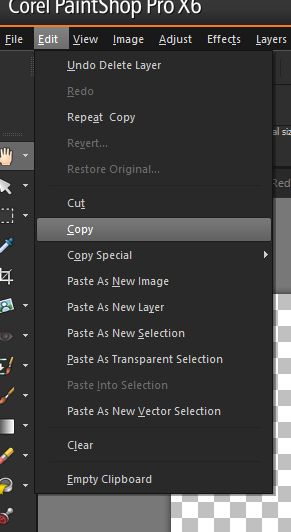
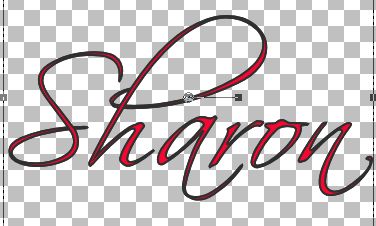
make a new topic 800 by 300 we will be using right now we can always make it smaller at the end pick out a red color like on the rose we have make the foreground black #000000 the background lets see red ##f70930 ok lets find a pretty swirly font..... I am going to use the popular one scriptina size 48 go to edit and hit copy you may want to use a thicker font on this one I was writing the tutorial when I was making the tag..
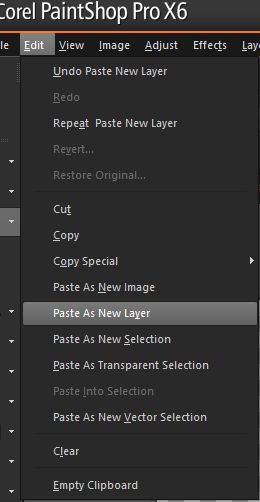
not go back to edit and click on paste as new image
now you will see 2 names not lined up so lets line them up it should look like this when we start
use your pick tool to move one of the names on top of one another
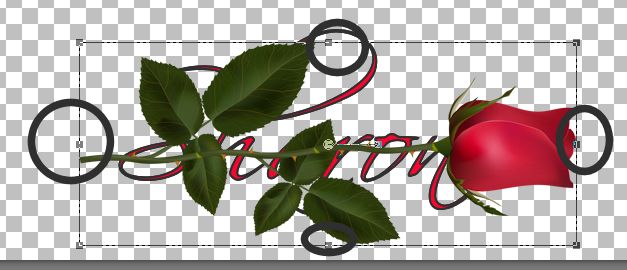
we still have 2 names on the right hand side ok we are now going to grab our flower copy and paste it to the name image move the rose around to fit your name see the corners you can stretch the rose or pull it in and the same way up and down, play with the sides so the flower will fit your name
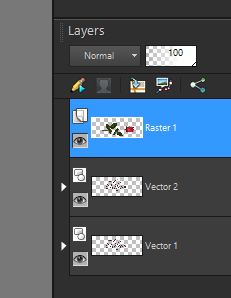
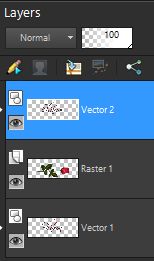
ok remember we have 2 name tags so we are going to move one above the rose was like this one
now move the name above
ok now we have a name in front of and behind the rose we are going to go to the eraser and erase some of the name on top of the flower....
it may noi look like you erased a lot on the name but with a thicker font it may shine better and here is the results Layers hit merge merge all for a white background... Layers hit merge and merge visible for the png look... clear background
|