
|
DelitefulHeartsTags
Aimoo Forum List |
Ticket |
Today |
Member |
Search |
Who's On |
Help |
Sign In |
 |
|

|
| Title: Motion Blur at 90 degree angle Radical blur | |
| DelitefulHeartsTags > Cyane / Sharons Avenue > Sharons Tutorials | Go to subcategory: |
| Author | Content |
Sharon2Rusty

|
|
|
Date Posted:03/29/2024 6:22 PMCopy HTML I am going to use this polka dot wallpaper from Digicats and dogs please credit me properly as Digicats (& Dogs). A link to my blog (http://digicats.blogspot.com) is appreciated, but not necessary.
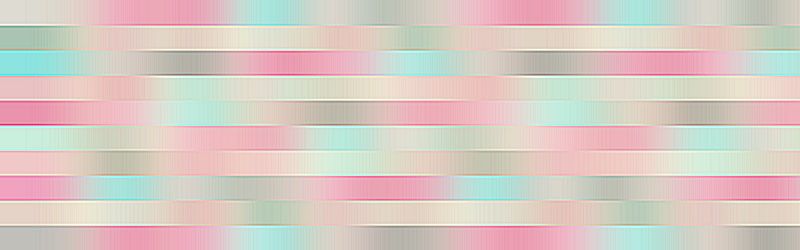
I am going to resize it down and adjust it to make a banner like this one
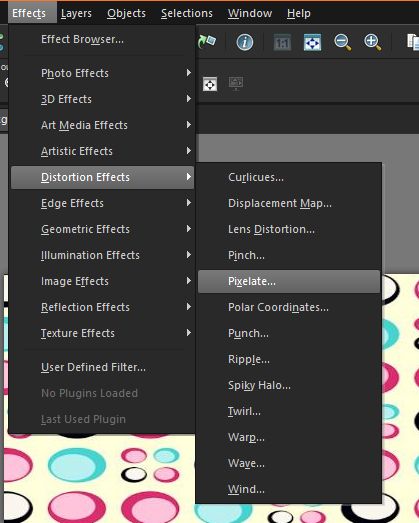
what e are going to do is pixelate it so go to effect distoration pixelette
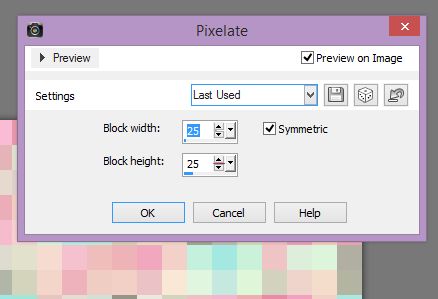
I am going to use a 25 on both you can do more or less it is up to you
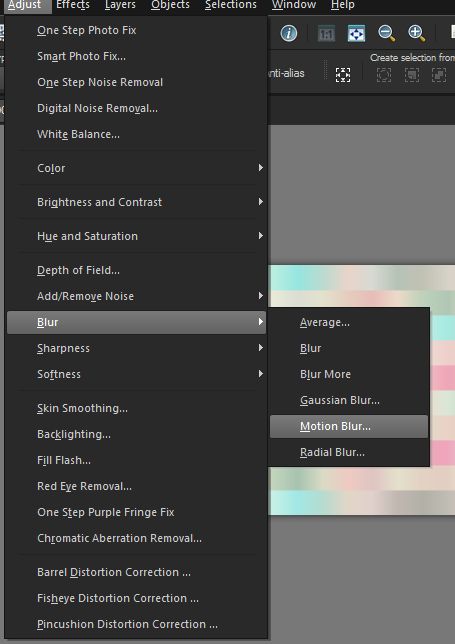
adjust blur motion blur angle 90 strength 100
now you can do this one tine or two times, I did it 2 times
go to adjust sharpen sharpen more I did this one 2 times also
now you have that sharpen look to it you are done add some elements and anything to it... have fun
|






Copyright © 2000- Aimoo Free Forum All rights reserved.
